Twinky Blink: A Handwritten Typeface for Modern Web Design
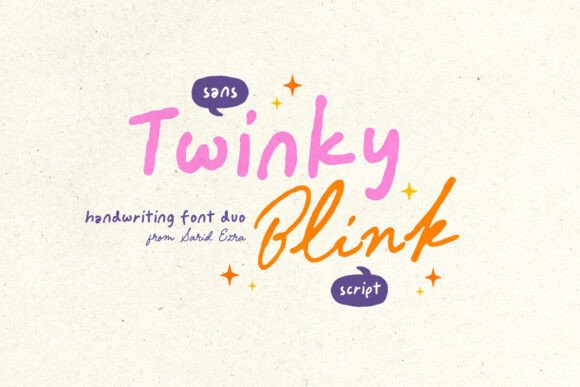
I was staring at a blank hero section on a new coaching website project, trying to find the right balance between professional polish and personal warmth. The client wanted a brand that felt approachable but not unprofessional. I needed a handwritten font that could carry a headline without looking like a child's doodle or a generic template. That is when I decided to test Twinky Blink, a package of two complementary fonts from the Script Amp collection.
Uploading the files into my design software, I immediately noticed the distinct personality of the typeface. It isn't just a standard script; it has a genuine modern typography feel that works surprisingly well in digital environments. The package includes a Sans and a Script version, which was exactly what I needed to create a cohesive visual hierarchy without mixing too many different styles.
Testing Twinky Blink in a Real Hero Section
The first step in any web design process is checking how a typeface performs in its primary role. I placed the Script variant as the main headline for the coaching site's hero banner. My initial concern with handwritten fonts is often legibility on screens, especially when overlaid on complex images. However, Twinky Blink held up well. The letterforms were open enough to be readable even at smaller sizes, yet they retained that charming, handmade aesthetic.
I paired the Script font with a clean, geometric sans serif for the subheadline. This classic font pairing strategy ensured that while the eye was drawn to the decorative title, the actual information remained scannable. The contrast between the flowing lines of the script and the structured geometry of the sans serif created a dynamic tension that kept the layout interesting. It felt less like a static poster and more like a living brand identity.
For a boutique online store or a portfolio homepage, this combination allows you to showcase creativity without sacrificing clarity. When users land on the page, they should feel an emotional connection immediately. Twinky Blink delivers that human touch effectively, making the brand feel curated and thoughtful rather than mass-produced.
Readability Across Devices
One of the most critical aspects of using a display font is ensuring it functions across all screen sizes. I tested the responsive layout on mobile devices to see how the Twinky Blink typeface behaved. On smaller screens, large headlines can sometimes become illegible if the spacing is too tight. Fortunately, the kerning in this font family is generous, allowing the letters to breathe even when scaled down.
When designing for mobile, I recommend keeping the script font reserved for short phrases or titles. Using long paragraphs in a handwritten style can lead to reading fatigue. Instead, use the accompanying Sans font for body copy. This ensures that your content remains accessible to everyone, including those who rely on assistive technologies or have dyslexia. The versatility of this premium font means you can maintain a consistent brand voice while adapting to the technical constraints of web development.
If you are building a landing page for a course or a product launch, readability is key to conversion. Users scan pages quickly, and a clear visual hierarchy guides them toward the call-to-action buttons. By using Twinky Blink for the hook and a neutral sans serif for the details, you direct attention exactly where you want it.
Building a Polished Brand Experience
Beyond the hero section, I explored how this typeface could integrate into other parts of the digital ecosystem. For a creative portfolio, using the Script font for section headings adds a layer of sophistication. It transforms a standard grid layout into something that feels more editorial and custom-made.
I also considered using the font for email marketing templates. In a crowded inbox, a subject line featuring a unique script font can stand out significantly. However, it is important to remember that not all email clients support web fonts perfectly. For maximum compatibility, I suggest using the font as an image overlay in emails or sticking to system fonts for the actual text body, reserving the handwritten style for graphical elements like headers or banners.
The commercial license included with the package is another major plus for freelancers and agency owners. Whether you are creating a digital brand kit for a client or designing assets for a small business website, having the rights to use the font across multiple projects saves time and legal headaches. It covers everything from social media graphics to printed packaging designs, ensuring your brand identity remains consistent offline and online.
Strategic Font Pairing for Digital Identity
Selecting the right partner for your display font is crucial for a professional look. Since Twinky Blink comes with its own Sans variant, the integration is seamless. But if you need to mix it with a third-party typeface, a simple sans serif or a modern serif works best. Avoid pairing it with another decorative font, as this creates visual noise and confuses the user's eye.
- Hero Headlines: Use the Script version to capture attention instantly.
- Subheadings: Use the Sans version or a lightweight sans serif to provide context.
- Body Copy: Stick to a highly legible sans serif or serif font for long-form reading.
- Buttons and CTAs: Use uppercase sans serif text for clarity and action.
This approach ensures that your website loads fast and looks good on every device. Fast-loading visual content is essential for SEO and user retention. While custom fonts can sometimes impact load times, using a limited set of weights and formats helps mitigate this. Always check the file formats provided by the designer before committing to a specific web implementation.
From Concept to Launch
By the end of the project, the website felt complete. The Twinky Blink typeface had transformed a generic layout into a distinctive brand experience. The client loved the way the handwritten elements added personality without overwhelming the content. It struck the perfect balance between artistic flair and functional design.
Whether you are a web designer looking for a new tool for your next client project, a UI designer refining a mobile app interface, or a digital product creator building a sales page, this font offers a versatile solution. It proves that you don't have to choose between style and substance. With the right application, a creative font like Twinky Blink can elevate your entire digital presence.
When you start your next design challenge, consider how a handwritten element might soften your interface or add a touch of elegance. Test the fonts in your actual layouts, check the mobile view, and ensure the hierarchy supports your user journey. Sometimes, the difference between a good website and a great one lies in the subtle choices of typography. Twinky Blink provides that missing piece, ready to help you build a more polished, trustworthy, and engaging online brand.